
CORS
Critical information about Cross-Origin Resource Sharing (CORS) and how it affects applications running in browser contexts.
CORS
Critical information about Cross-Origin Resource Sharing (CORS) and how it affects TelemetryOS applications.
What is CORS?
CORS (Cross-Origin Resource Sharing) is a browser security mechanism that controls which websites can make requests to an application or API.
The Problem
Web browsers enforce the Same-Origin Policy for security:
App Origin:          https://studio.telemetryos.com
External API:        https://api.weather.com

Without CORS approval: ❌ Browser blocks the request
With CORS approval:    ✅ Browser allows the request
An origin is the combination of protocol, domain, and port -- for example, https://api.weather.com:443. Any request to a different origin requires CORS permission from the target server.
Why CORS Matters for TelemetryOS
TelemetryOS applications run in browser contexts -- on devices (iframes on TVs, kiosks, and displays), in Studio (settings mount points inside admin portal iframes), and during local development (in the Developer App's canvas). All of these contexts enforce CORS.
Common CORS Error
Access to fetch at 'https://jsonplaceholder.typicode.com/posts' from origin
'https://studio.telemetryos.com' has been blocked by CORS policy:
No 'Access-Control-Allow-Origin' header is present on the requested resource.
This error means the external API doesn't allow requests from your application's origin, so the browser blocked the request for security. There is no way to bypass this restriction in client-side code.
When CORS Blocks Requests
Scenario 1: Public API Without CORS
// This will likely fail with CORS error
const response = await fetch('https://api.publicdata.com/stats');
Why: Many public APIs don't enable CORS because they expect server-side usage only.
Scenario 2: Private API Without CORS
// This will fail with CORS error
const response = await fetch('https://company-api.com/data');
Why: Internal APIs may not have CORS configured if built for server-to-server communication.
Scenario 3: API with Restricted CORS
// API only allows requests from example.com
// The telemetryos.com origin is blocked
const response = await fetch('https://partner-api.com/data');
Why: API configured CORS to only allow specific domains.
The TelemetryOS Solution: Proxy API
TelemetryOS provides a Proxy API that bypasses CORS restrictions by routing requests through the TelemetryOS platform.
How It Works
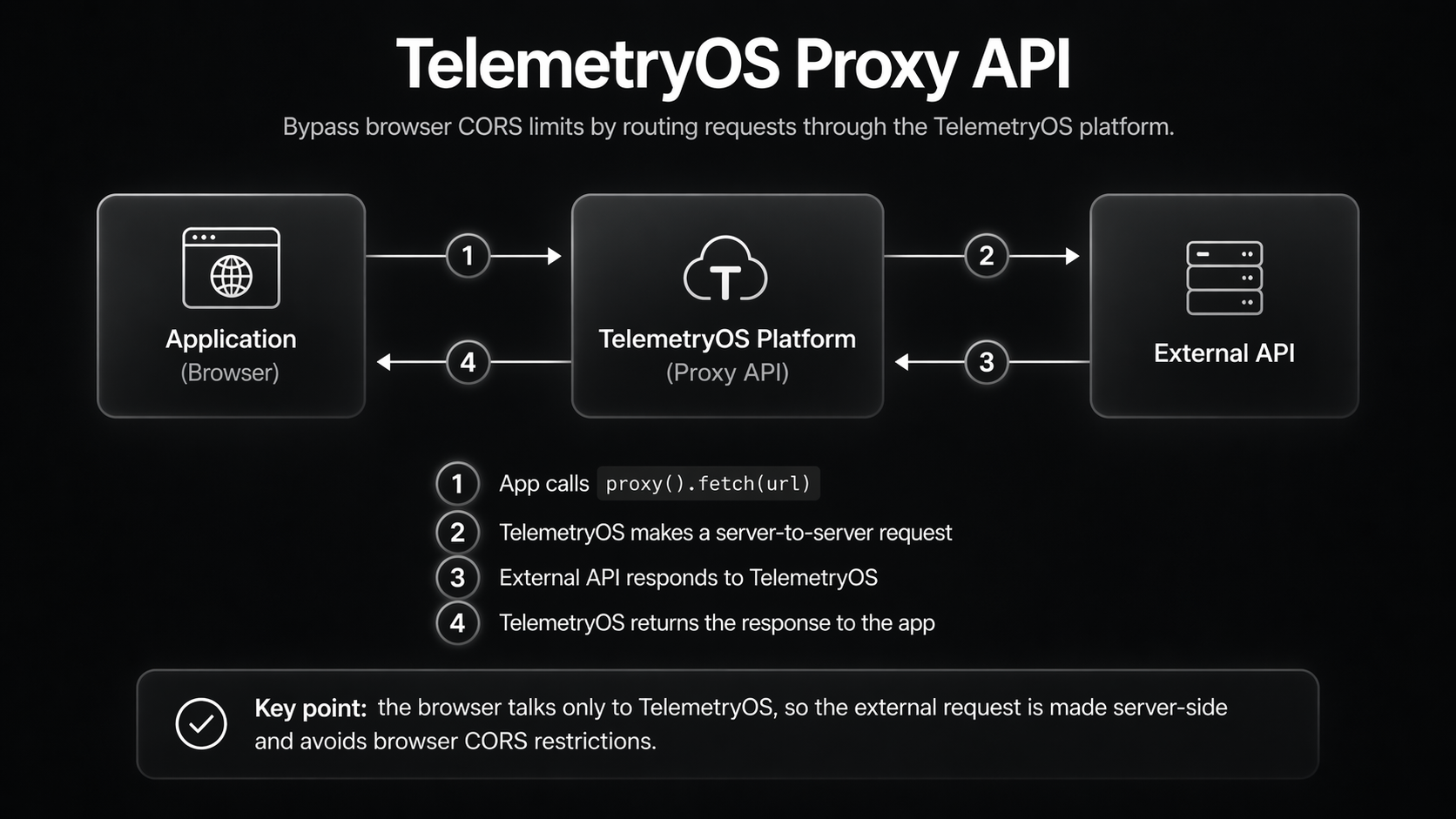
Steps:
- Your app calls
proxy().fetch(url)- Request goes to TelemetryOS platform - Platform makes server-to-server request (no CORS restrictions)
- Platform returns response to the application
Key Point: Server-to-server requests don't have CORS restrictions. The Proxy API moves the request to the server side.
Using the Proxy API
Basic Usage
import { proxy } from '@telemetryos/sdk';

// Instead of direct fetch
// const response = await fetch('https://jsonplaceholder.typicode.com/posts/1');

// Use proxy
const response = await proxy().fetch('https://api.github.com/users/octocat');
const data = await response.json();
With API Keys
async function fetchWeather(city: string) {
  const apiKey = 'your-api-key-here';
  const url = `https://api.weatherapi.com/v1/current.json?key=${apiKey}&q=${city}`;

  // Proxy handles CORS
  const response = await proxy().fetch(url);

  if (!response.ok) {
    throw new Error(`HTTP ${response.status}: ${response.statusText}`);
  }

  return await response.json();
}
POST Requests
async function submitData(data: any) {
  const response = await proxy().fetch('https://jsonplaceholder.typicode.com/posts', {
    method: 'POST',
    headers: {
      'Content-Type': 'application/json'
    },
    body: JSON.stringify(data)
  });

  return await response.json();
}
Custom Headers
const response = await proxy().fetch('https://httpbin.org/get', {
  headers: {
    'Authorization': 'Bearer your-token',
    'X-Custom-Header': 'value'
  }
});
When Proxy API is NOT Needed
1. CORS-Enabled APIs
Some APIs explicitly enable CORS:
// This works because API allows all origins
const response = await fetch('https://api.coinbase.com/v2/exchange-rates');
How to Check: Look for API documentation mentioning CORS support or "browser-friendly" APIs.
2. TelemetryOS Resources
TelemetryOS-hosted resources already allow the application origin:
// Media API returns publicUrl values that work directly
const items = await media().getAllByTag('featured');
const imageUrl = items[0].publicUrl;

// Direct usage works
<img src={imageUrl} />
3. Public CDNs
Most CDNs enable CORS for asset delivery:
// Public CDN resources typically work
<script src="https://cdn.jsdelivr.net/npm/[email protected]/dist/lib.js"></script>
<img src="https://images.unsplash.com/photo-123" />
Best Practices
1. Default to Proxy for External APIs
// ✅ Safe - always works
const response = await proxy().fetch('https://api.github.com/users/octocat');

// ❌ Risky - may work in dev, fail in production
const response = await fetch('https://api.github.com/users/octocat');
2. Test with Real APIs During Development
Local development may not enforce CORS the same way production does. Open the project in the Developer App and make real calls through proxy().fetch() — the proxy mirrors production behavior, so CORS issues surface locally instead of only on deployed devices.
3. Handle Proxy Errors
try {
  const response = await proxy().fetch(url);

  if (!response.ok) {
    throw new Error(`HTTP ${response.status}`);
  }

  const data = await response.json();
  return data;
} catch (error) {
  console.error('API call failed:', error);
  // Provide fallback or user-friendly error
  return null;
}
4. Leverage Platform Caching
The Proxy API includes built-in fleet-wide caching — you do not need to build your own caching layer. Control cache duration using standard Cache-Control headers:
// Cache for 1 hour across the entire device fleet
const response = await proxy().fetch('https://api.example.com/data', {
  headers: { 'Cache-Control': 'max-age=3600' }
});
const data = await response.json();
See Proxy Methods for complete caching documentation.
Common CORS Scenarios
Scenario 1: Weather API Integration
// ❌ Without proxy - CORS error
async function getWeatherBad(city: string) {
  const response = await fetch(
    `https://api.weatherapi.com/v1/current.json?key=API_KEY&q=${city}`
  );
  return await response.json();
}

// ✅ With proxy - works perfectly
async function getWeatherGood(city: string) {
  const response = await proxy().fetch(
    `https://api.weatherapi.com/v1/current.json?key=API_KEY&q=${city}`
  );
  return await response.json();
}
Scenario 2: Internal Backend API
// With an internal backend API
// ❌ Without CORS configuration or proxy
const response = await fetch('https://backend.example.com/api/data');

// ✅ Option 1: Configure CORS on the backend
// Allow: https://*.telemetryos.com

// ✅ Option 2: Use proxy
const response = await proxy().fetch('https://backend.example.com/api/data');
Scenario 3: GraphQL APIs
async function queryGraphQL(query: string) {
  const response = await proxy().fetch('https://graphql.org/swapi-graphql', {
    method: 'POST',
    headers: {
      'Content-Type': 'application/json'
    },
    body: JSON.stringify({ query })
  });

  return await response.json();
}
Troubleshooting CORS Issues
Error: "blocked by CORS policy"
Solution: Use proxy().fetch() instead of fetch()
Error: "Failed to fetch"
Verify that the URL is correct and the API endpoint is online. Confirm you are using proxy().fetch() for external APIs, and check the browser console for a more specific CORS error message.
Local Development Works, Production Fails
Cause: Local development may not enforce CORS the same way.
Solution: Always test with proxy().fetch() even in local development.
API Returns 403/401
Not CORS: This is an authentication/authorization error.
Solution: Check API keys, tokens, and authentication headers.
Additional Proxy Benefits
Beyond solving CORS, the Proxy API provides several operational advantages. The platform caches responses to reduce redundant API calls and optimizes bandwidth through shared quota across all devices. It also offers built-in monitoring for tracking API usage and performance, handles rate limiting gracefully so individual devices don't overwhelm external services, and automatically retries transient failures for improved reliability.
Summary
Because TelemetryOS applications run in browser contexts, CORS is always enforced and cannot be disabled. Use proxy().fetch() for all external API calls -- it solves CORS issues while also adding platform-level caching and optimization. Always test with real APIs during development, since direct fetch() calls to APIs that lack CORS headers will fail silently in production even if they appear to work locally.
Quick Decision Guide:
// External APIs (weather, news, social media, etc.)
await proxy().fetch(url) // ✅ Always use proxy

// TelemetryOS resources (media, etc.)
await fetch(publicUrl) // ✅ Direct fetch is fine

// Internal backend
// Either enable CORS on backend OR use proxy
await proxy().fetch(url) // ✅ Safest option
Next Steps
- Proxy Methods Reference - Complete proxy().fetch() documentation
- Code Examples - See proxy usage in context
- Getting Started - Build a first application
Updated 6 months ago